
Engineering Google Calendar Sync: The Hidden Complexity Behind SaaS Integrations
A deep dive into OAuth, real-time sync, conflict resolution, and the architecture required to build reliable, scalable calendar integrations in SaaS.

Google Calendar integration is one of the most complex integrations a SaaS platform can undertake. Unlike simple REST APIs, it involves managing user authentication, handling quotas, maintaining data consistency across distributed systems, managing calendar conflicts, and implementing robust synchronization strategies. This article explores the engineering architecture, design patterns, and critical considerations for integrating Google Calendar into a SaaS application.
Table of Contents
Architecture Overview
Authentication & Authorization Flow
Data Synchronization Strategies
API Integration Pattern
Rate Limiting & Quota Management
Conflict Resolution
Scalability Consideration
Error Handling & Resilience
Real-World Challenges
Architecture Overview
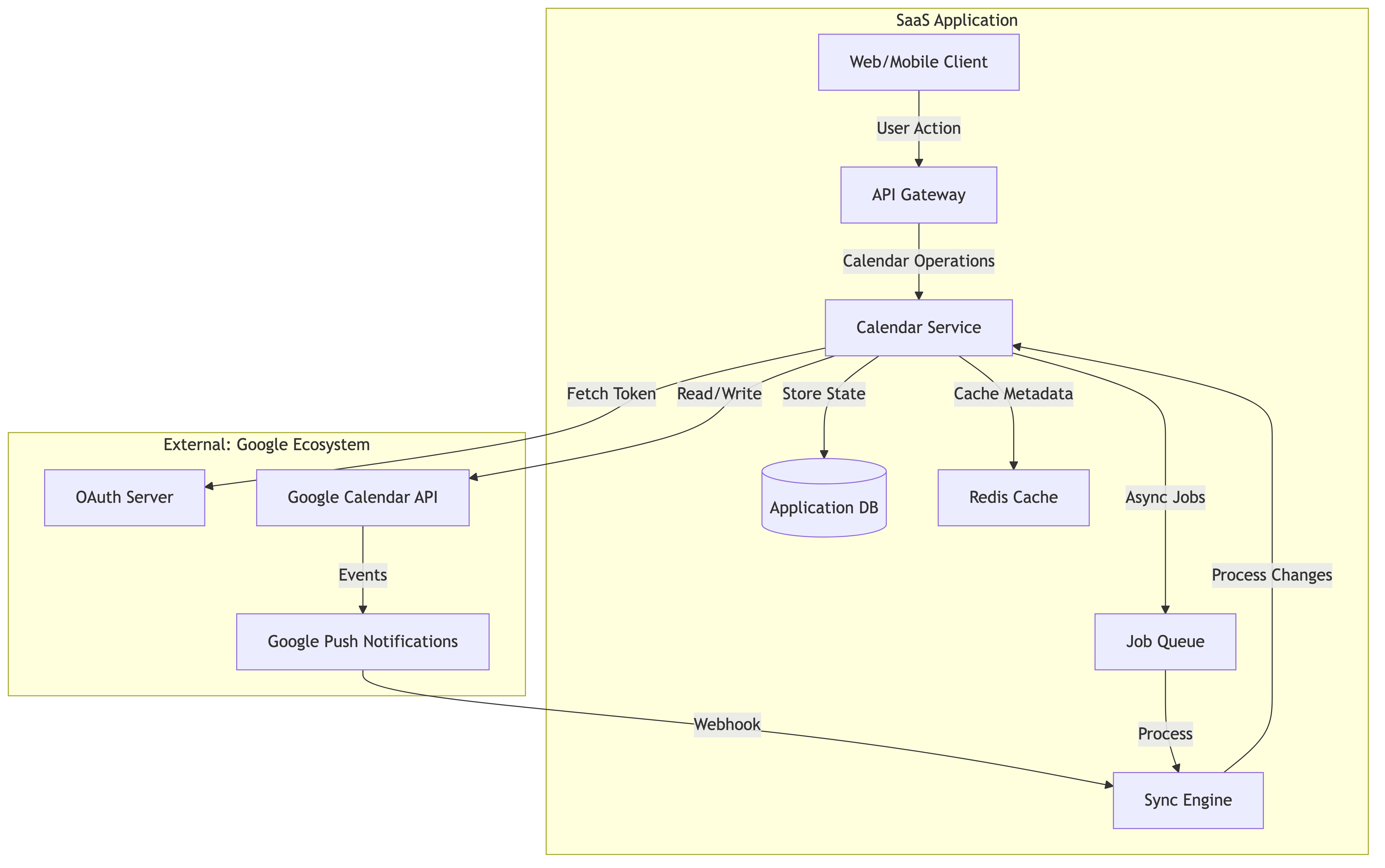
Core Components
Calendar Service Layer: Abstracts Google Calendar API interactions
Sync Engine: Handles bidirectional synchronization
Token Manager: Manages OAuth tokens, refresh cycles, and token rotation
Conflict Resolver: Handles race conditions and concurrent modifications
Queue System: Manages asynchronous operations and retries
Cache Layer: Reduces API calls through intelligent caching
Authentication & Authorization Flow
OAuth 2.0 Implementation Strategy
Google Calendar requires OAuth 2.0 with specific scopes. The engineering challenge isn’t just implementing OAuth—it’s handling the complexity of token lifecycle, scope negotiation, and incremental authorization.
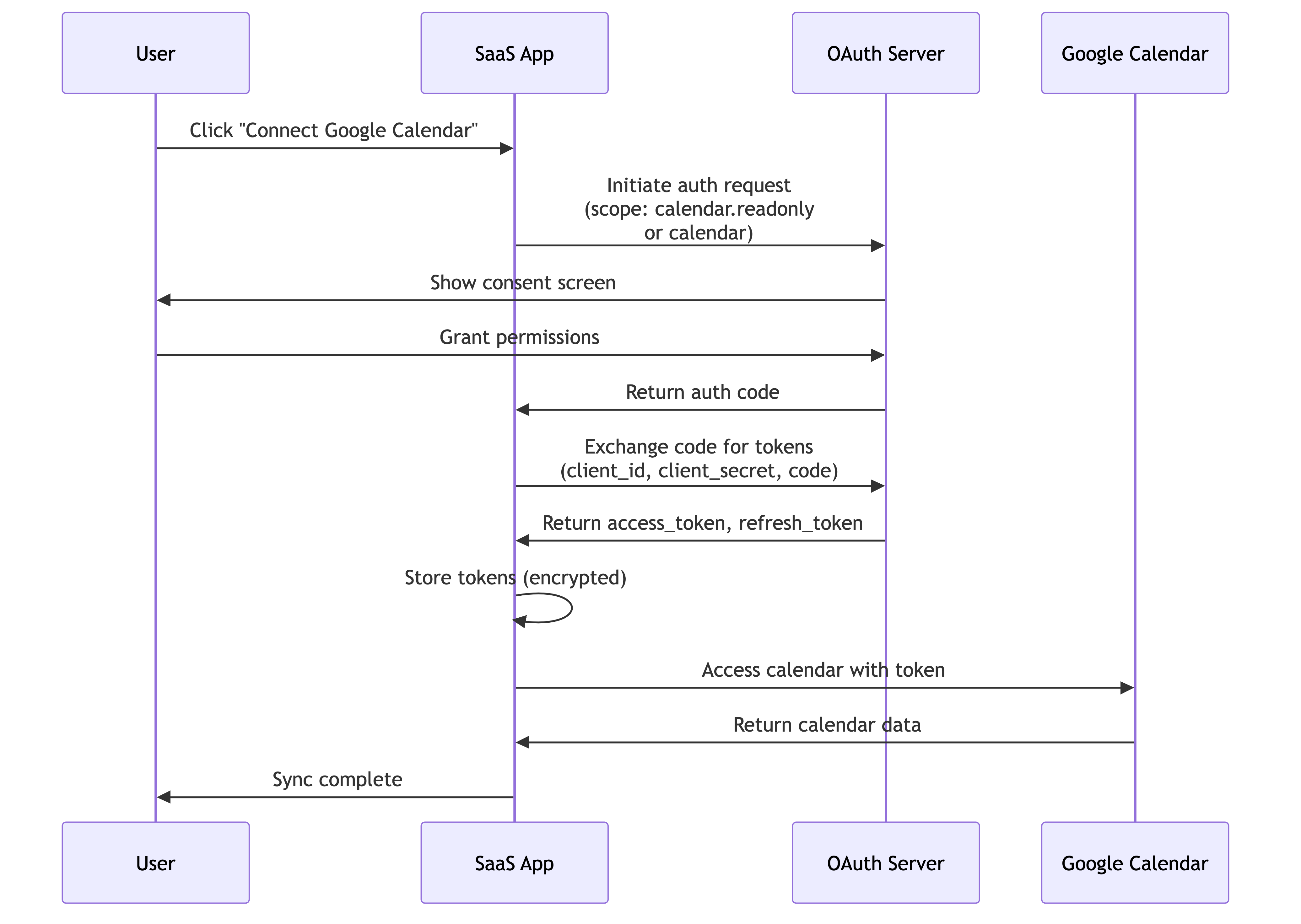
Critical Design Decisions
1. Scope Selection
Scope Hierarchy:
├── calendar.readonly (Read-only access)
├── calendar (Full access)
└── calendar.events (Event-specific operations)
Engineering Consideration: Requesting broader scopes upfront reduces friction but increases security risk. Many SaaS applications request calendar.readonly initially and use incremental authorization to request calendar (write access) only when the user attempts to create/modify events.
2. Token Storage Strategy

Engineering Consideration:
Store tokens in an encrypted column in the database
Use a Key Management Service (KMS) for encryption keys
Never log or display tokens in plaintext
Implement token rotation strategies before expiration
3. Token Refresh Lifecycle
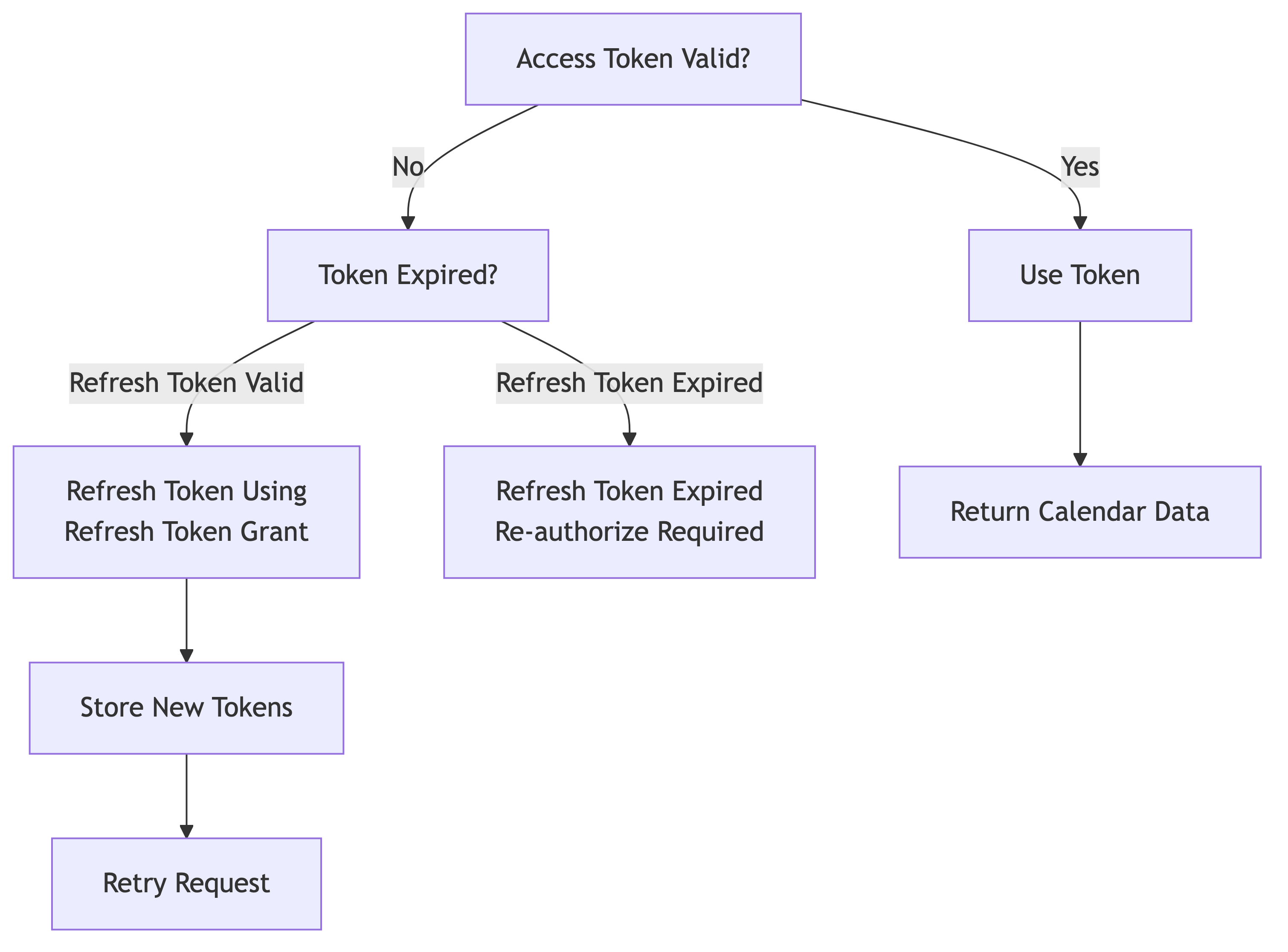
Key Engineering Insight:
Google access tokens expire in ~1 hour
Refresh tokens are long-lived (6 months with inactivity timeout)
Implement proactive refresh 5 minutes before expiration
Handle the case where refresh token becomes invalid (user revoked, or 6-month inactivity)
Data Synchronization Strategies
The Two-Way Synchronization Challenge
The biggest engineering challenge in calendar integration is maintaining consistency when:
User modifies events directly in Google Calendar
User creates events in your SAAS Application and that needs to be synced across
Both happen concurrently
Strategy 1: Push-Based Synchronization (Watch API)
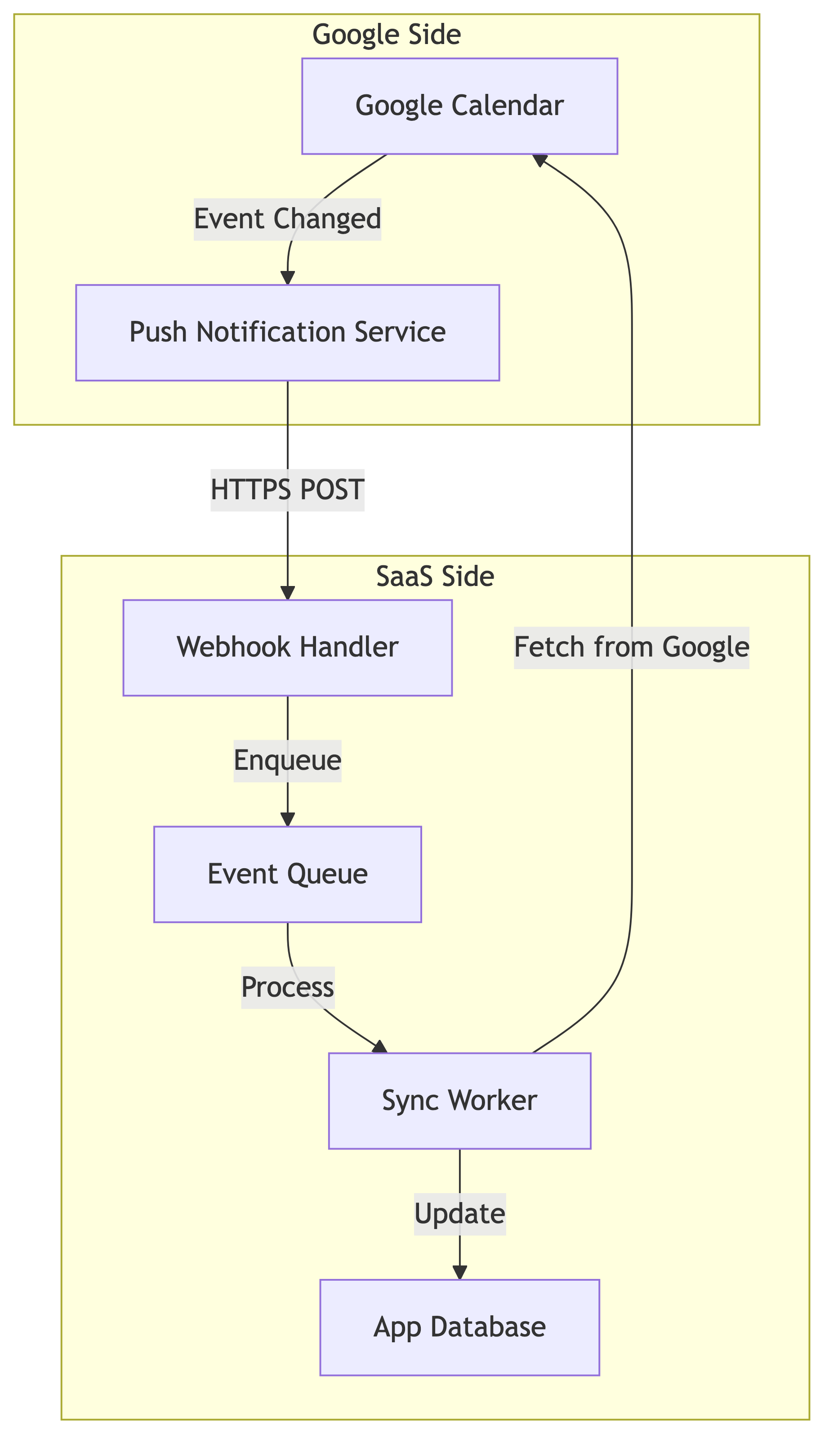
How Watch API Works:
SaaS app registers a “watch” on a calendar with a webhook URL
Google sends notifications to that URL when calendar changes
Notification contains only metadata (calendar ID, resource IDs)
SaaS app fetches actual event data via API call
Engineering Considerations:
Webhook Reliability:
Google only guarantees “at least once” delivery
Webhooks might arrive out of order
Handle duplicate notifications idempotently
Implement webhook signature verification
Watch Expiration:
Watch subscriptions expire after ~24-36 hours
Must renew watches periodically
Implement background job to track and renew expiring watches
Failed renewals require manual re-authorization
Webhook Implementation:
Webhook Characteristics:
- HTTPS only (Google validates certificate)
- Must respond with 200-299 within 5 seconds
- Async processing required (don't block response)
- Implement idempotency using event IDs
Strategy 2: Pull-Based Synchronization (Polling)
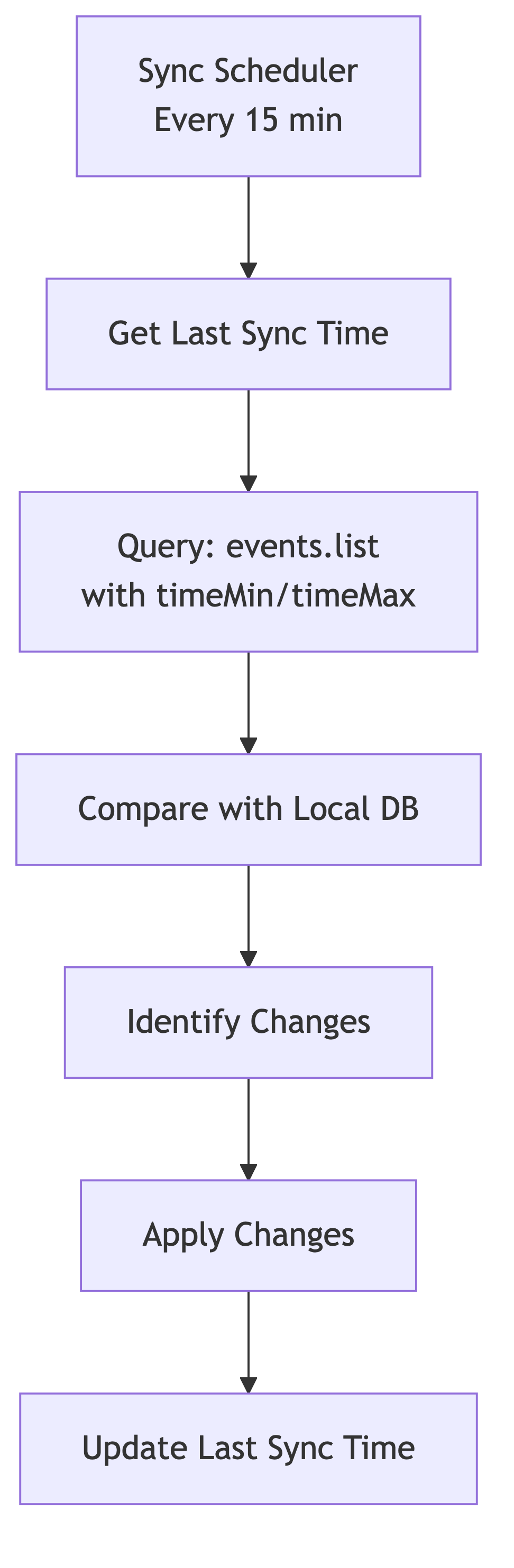
Engineering Considerations:
Sync Window Selection:
Sync only events modified since last sync (using
updatedMinparameter)Always include a small overlap window (5 minutes) for edge cases
Handle deleted events (fetch with
showDeleted=true)
Polling Frequency:
Trade-off between freshness and API quota usage
15-minute intervals: moderate freshness, reasonable quota usage
Real-time requirements demand watch API or hybrid approach
Delta Detection:
Calculate hash of event data to detect changes
Compare sync state with current state
Track
updatedTimefield from Google
Strategy 3: Hybrid Approach (Recommended)
Most mature integrations use a hybrid strategy:
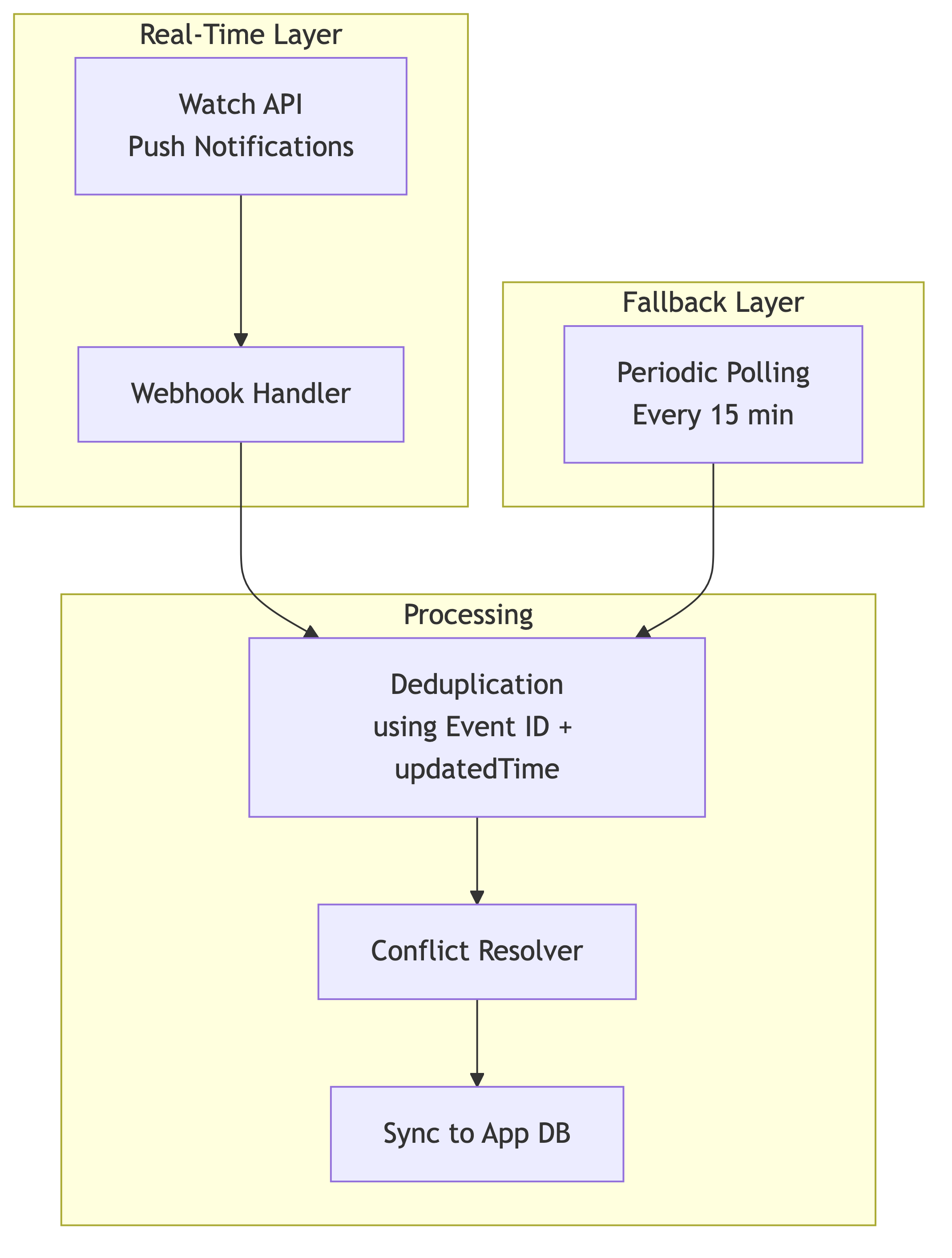
Why Hybrid?
Watch API handles 95% of changes in real-time
Polling catches cases where webhooks fail
Deduplication prevents applying same change twice
API Integration Patterns
Rate Limiting Architecture
Google Calendar API has complex quota management:
Quota Structure:
├── Queries Per Day: 1,000,000 (per project)
├── Queries Per User Per Day: 1,000,000
├── Queries Per 100 seconds: 100 (per user)
└── Queries Per Minute: 60 (per user-project combination)
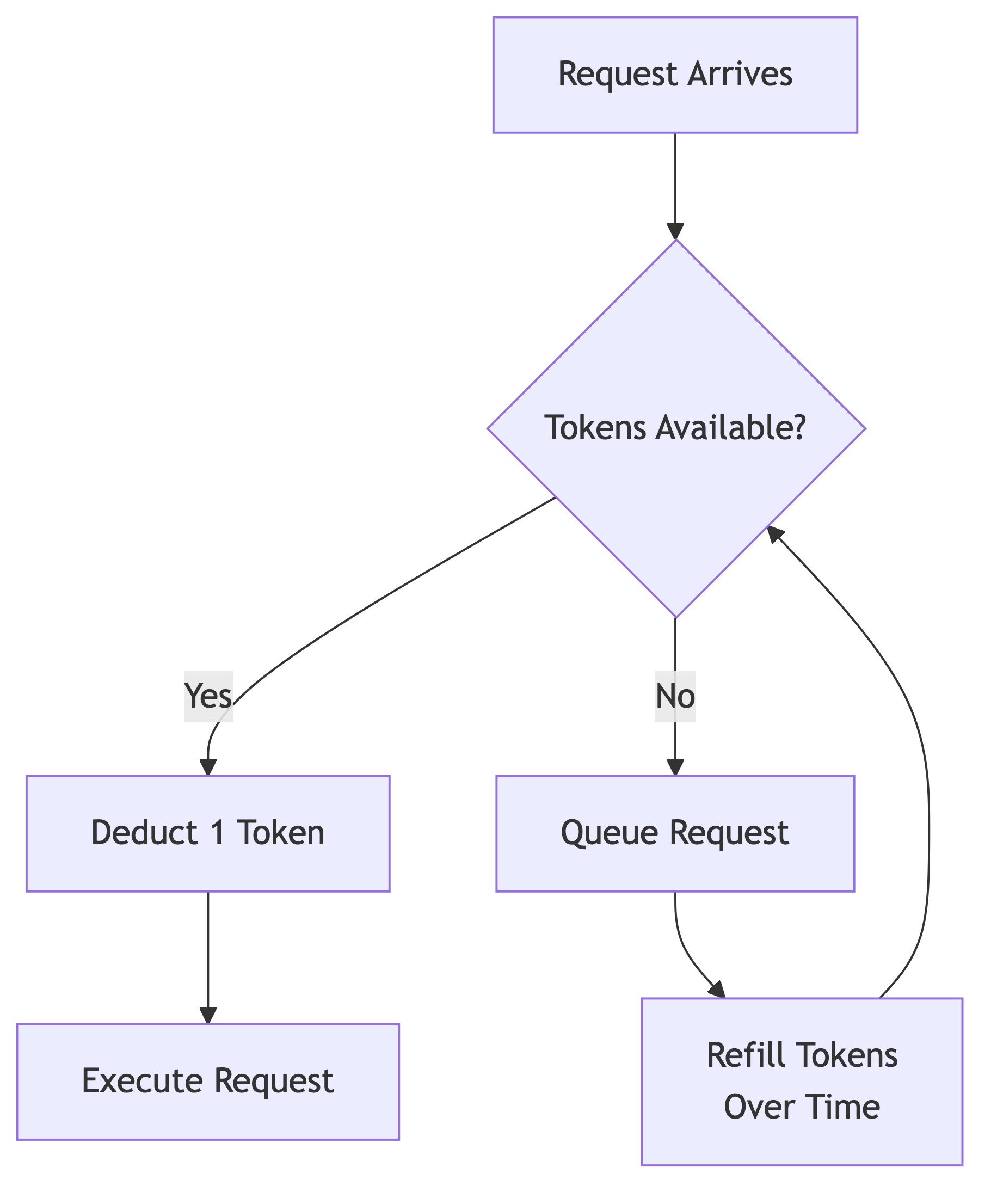
Token Bucket Algorithm for Rate Limiting
Circuit Breaker Pattern
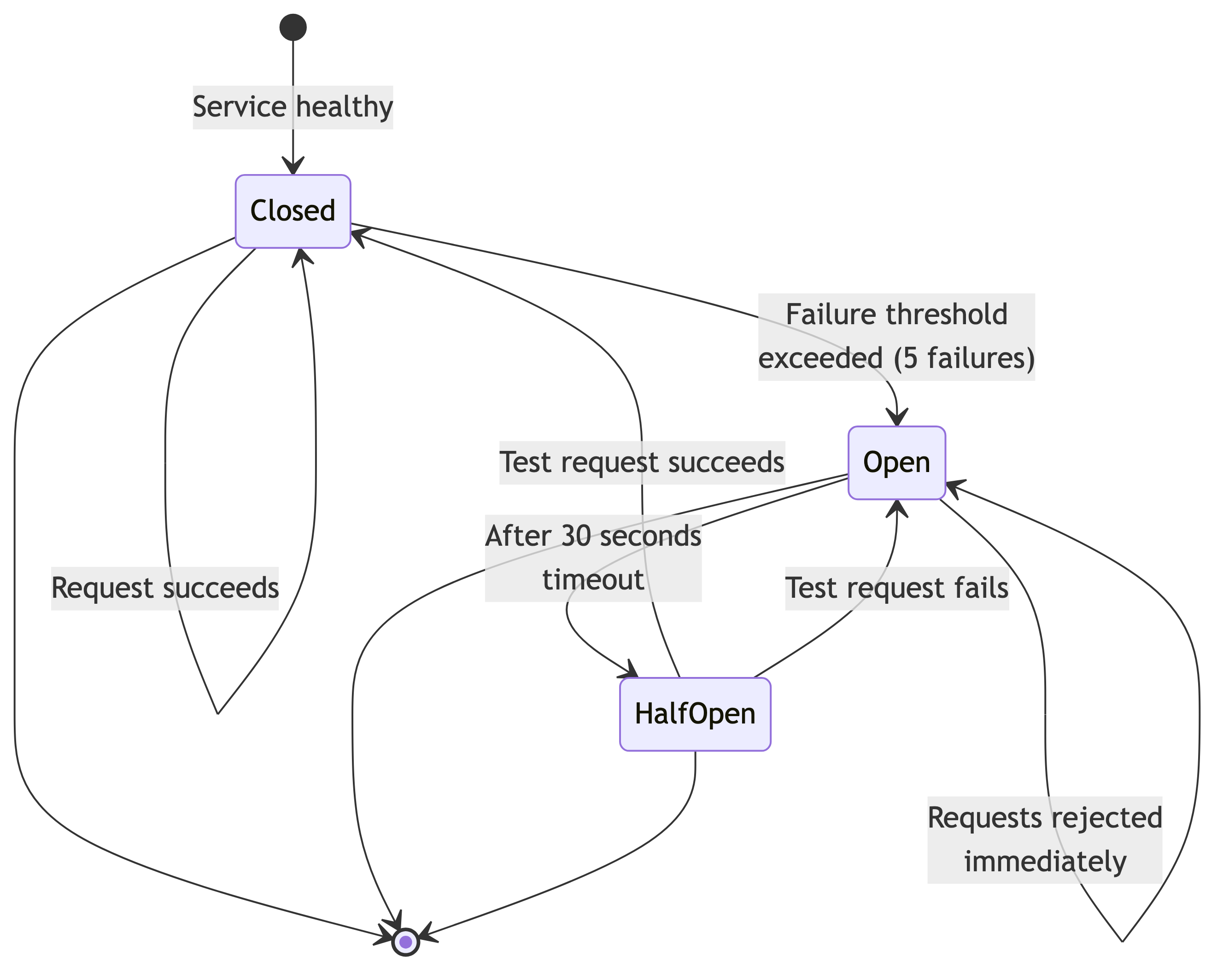
Engineering Implementation:
Track consecutive failures per calendar
After N failures, stop making requests temporarily
Try again periodically (exponential backoff)
Fail fast instead of hanging
Conflict Resolution
The Race Condition Problem
Timeline:
├─ T1: User A modifies event in Google Calendar
├─ T2: User B modifies same event in SaaS App
├─ T3: SaaS App receives webhook from Google
├─ T4: Sync engine processes both changes
└─ Result: Which version wins?
Strategy - 1: Last-Write-Wins (Simple)
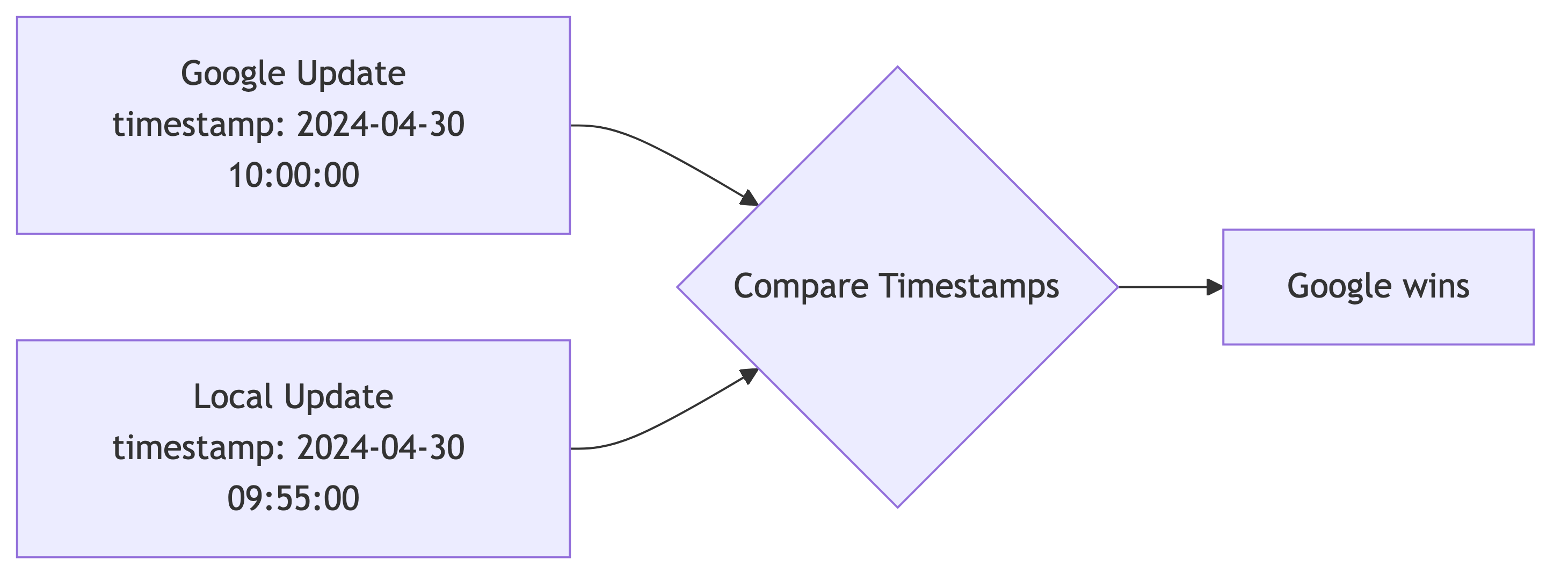
Pros: Simple to implement Cons: Data loss, unpredictable for users
Strategy - 2: Vector Clocks (Advanced)
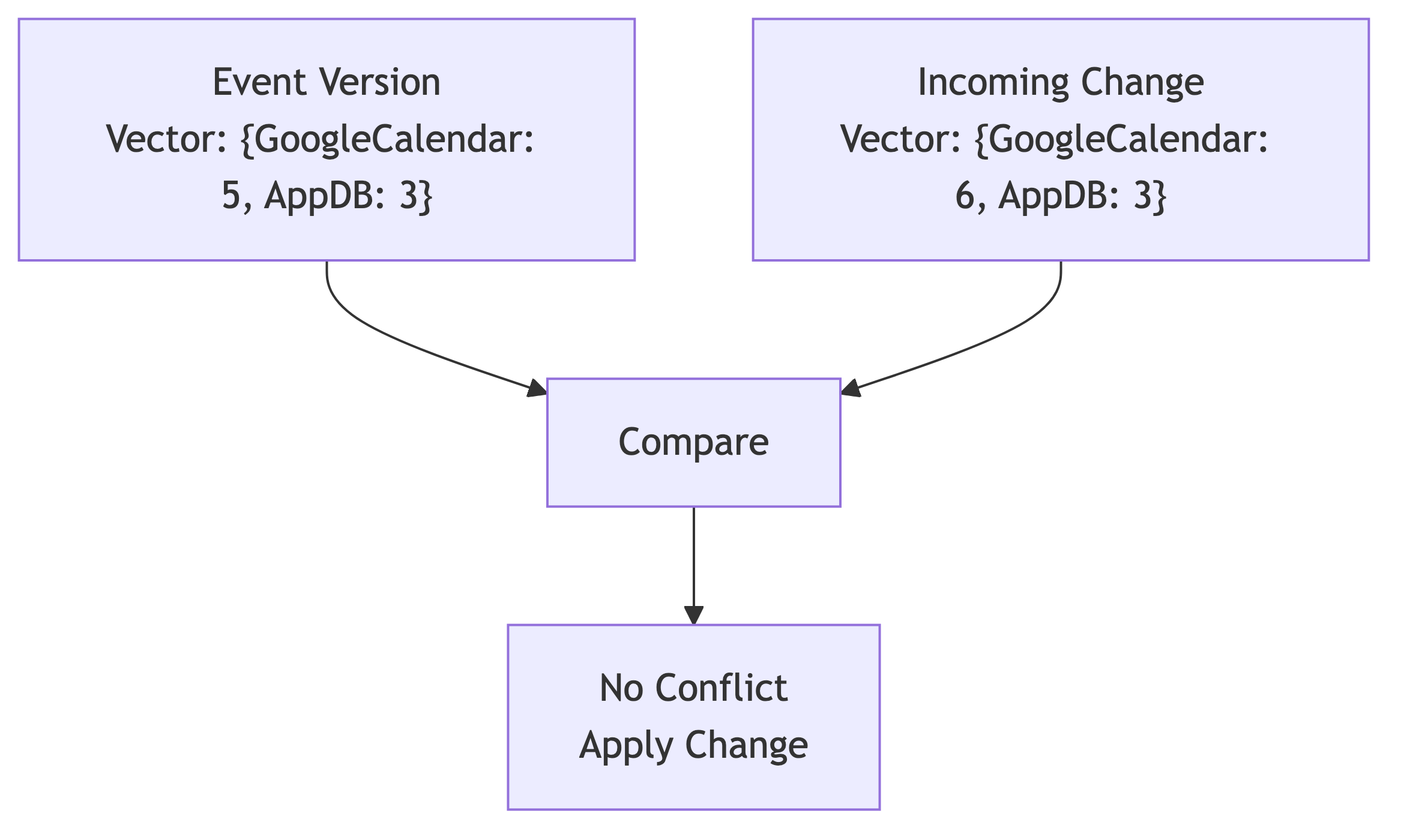
Pros: Detects true conflicts vs. causally related updates Cons: Complex to implement
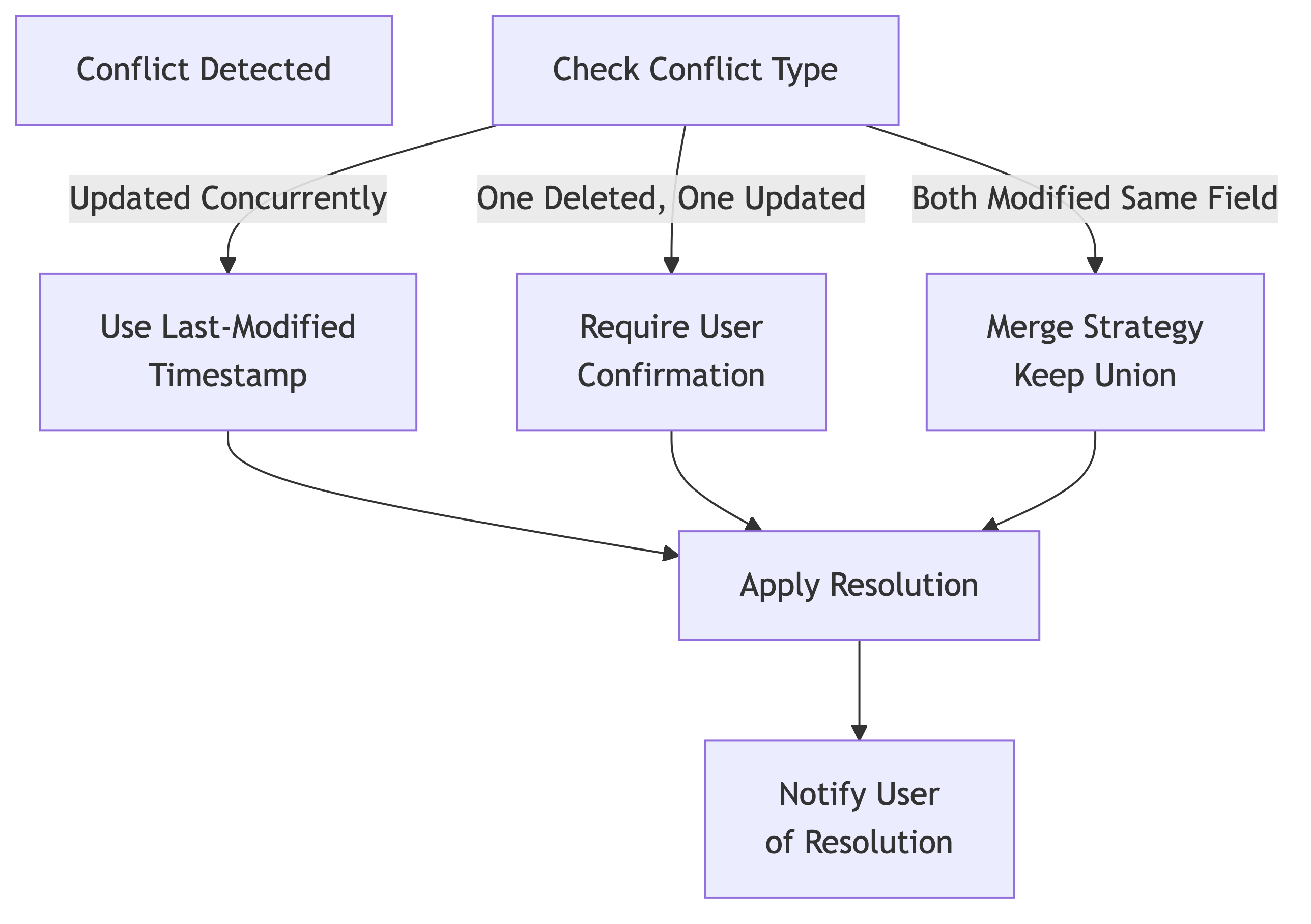
Conflict Resolution Strategies
Handling Event Deletions
Deletion Conflict Scenarios:
├── Scenario 1: User deletes in Google, modifies in App
│   └── Resolution: Soft delete in app, warn user
├── Scenario 2: User deletes in App, modifies in Google
│   └── Resolution: Recreate event, mark as restored
└── Scenario 3: User deletes in both (no conflict)
    └── Resolution: Clean up both
Scalability Considerations
Multi-Tenant Isolation
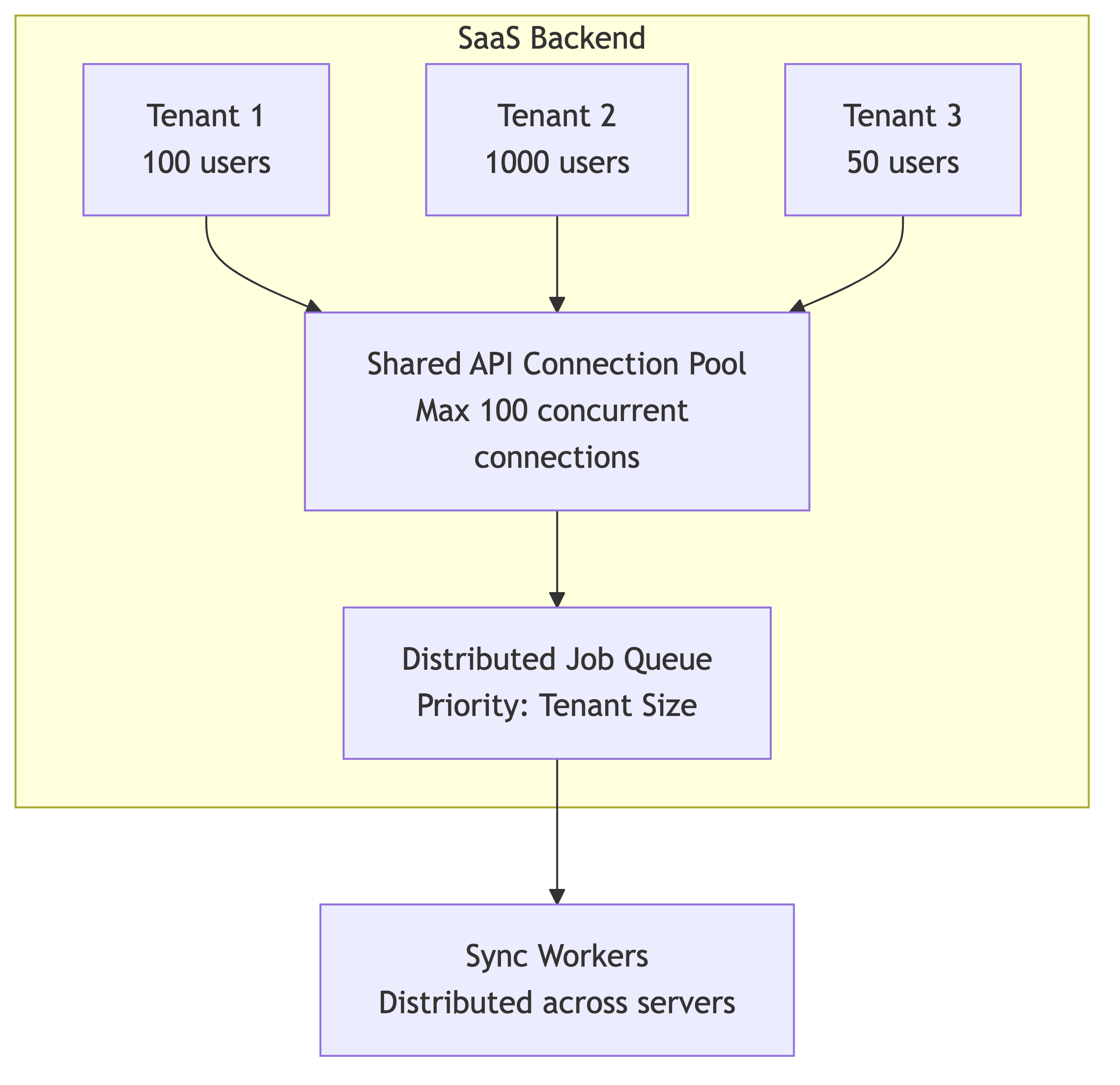
Engineering Considerations:
Resource Allocation:
Large tenants get more sync frequency
Prevent one tenant from starving others
Implement fair-share scheduling
Data Isolation:
Separate database tables per tenant (OR)
Partition tables by tenant_id with indexes
Each tenant has isolated token storage
Quota Management:
Track Google API quota per tenant
Implement per-tenant rate limiting
Alert when approaching limits
Database Schema Design
Core Tables:
├── users
│   ├── id (PK)
│   ├── email
│   └── google_user_id
│
├── calendar_tokens
│   ├── id (PK)
│   ├── user_id (FK)
│   ├── access_token (encrypted)
│   ├── refresh_token (encrypted)
│   ├── expires_at
│   ├── scopes
│   └── created_at
│
├── synced_calendars
│   ├── id (PK)
│   ├── user_id (FK)
│   ├── google_calendar_id
│   ├── calendar_name
│   ├── last_sync_time
│   ├── watch_id
│   ├── watch_expiration
│   └── sync_enabled
│
├── events
│   ├── id (PK)
│   ├── synced_calendar_id (FK)
│   ├── google_event_id (UK)
│   ├── title
│   ├── description
│   ├── start_time
│   ├── end_time
│   ├── recurrence_rules
│   ├── attendees (JSON)
│   ├── status (confirmed/cancelled/tentative)
│   ├── google_updated_at
│   ├── local_updated_at
│   ├── sync_state (synced/pending/conflict)
│   └── created_at
│
└── sync_logs
    ├── id (PK)
    ├── synced_calendar_id (FK)
    ├── sync_type (push/pull)
    ├── events_processed
    ├── conflicts_detected
    ├── execution_time_ms
    └── timestamp
Index Strategy:
Indexes:
├── events(google_event_id) - fast lookup
├── events(synced_calendar_id, google_updated_at) - range queries
├── calendar_tokens(user_id) - token lookup
├── synced_calendars(user_id) - user calendars
└── synced_calendars(watch_expiration) - renewal queries
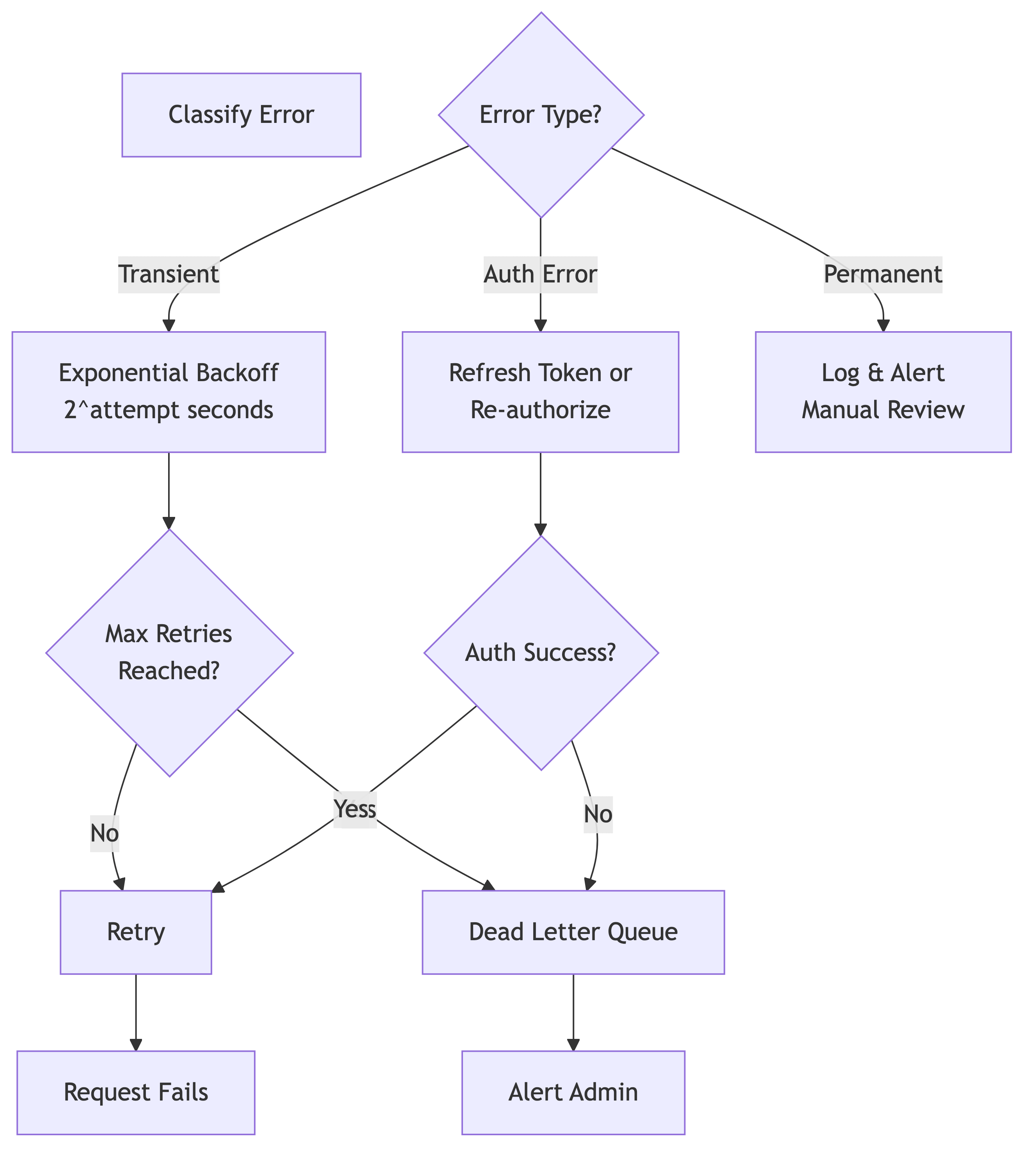
Error Handling, Resilience and Retry Strategy
Real-World Challenges
Challenge 1: Recurring Events
Problem: Google Calendar stores recurring events as a single master event with exception instances.
Recurring Event Structure:
└── Master Event (ID: abc123)
    ├── Recurrence Rule: FREQ=WEEKLY;BYDAY=MO,WE,FR
    └── Instances
        ├── Instance 1: 2024-04-01 (original)
        ├── Instance 2: 2024-04-03 (modified)
        └── Instance 3: 2024-04-05 (original)
Engineering Solution:
Store master event separately from instances
Track modified instances in a join table
When updating one instance, create an exception
When updating series, update master and propagate (carefully)
Challenge 2: Timezone Handling
Problem: Users may change timezones. A 9 AM meeting should move when timezone changes.
Timezone Scenarios:
├── Event created in EST, user moves to PST
│   └── Start time should appear 3 hours later
├── All-day event (no timezone)
│   └── Should stay on same calendar date
└── Floating time with timezone
    └── Should adjust based on timezone rules
Engineering Solution:
Always store times in UTC internally
Store user’s timezone preference separately
Convert display times based on user context
Handle timezone definition changes (DST transitions)
Challenge 3: Attendees & Invitations
Problem: Managing attendee lists, responses, and permissions is complex.
Attendee State Machine:
┌─────────────┐
│ Invited     │
└──────┬──────┘
       │
       ├─ Accepted ───┐
       ├─ Declined ───┤
       └─ Tentative ──┤
                      │
                      └──→ Final State

User can also:
- Add themselves to event
- Be removed by organizer
- Change their own response
Engineering Considerations:
Track organizer vs. attendee permissions
Handle cascading changes (removing attendee from all instances)
Manage RSVP responses carefully (avoid overwriting)
Implement delegation patterns (organizer can modify on behalf)
Challenge 4: Calendar Sharing & Permissions
Problem: Users may have multiple calendars with different permission levels.
Permission Model:
├── Primary Calendar
│   └── User has full control
├── Shared Calendars
│   └── May have read-only or edit access
├── Delegated Calendars
│   └── Another user granted delegate access
└── Organization Calendars
    └── Manage through workspace settings
Engineering Solution:
Query user’s calendar list with
accessRolefieldEnforce ACLs in application layer
Prevent operations user doesn’t have permission for
Handle permission changes (user loses access mid-sync)
Challenge 5: Large Event Attendee Lists
Problem: Some events have 100+ attendees. Google limits return fields.
API Response Size Consideration:
├── Event with 10 attendees: ~2 KB
├── Event with 100 attendees: ~20 KB
└── Calendar with 500 events, avg 50 attendees: ~10 MB
Engineering Solution:
Use pagination for attendee lists
Request only necessary fields (
fieldsparameter)Implement partial syncing (sync attendees separately)
Cache attendee data aggressively
Challenge 6: Handling Deleted Calendars
Problem: User deletes calendar in Google, but app doesn’t know.
Discovery Scenario:
├── User deletes calendar in Google
├── App attempts sync
├── API returns 404 (not found)
├── App needs to detect this and clean up
└── User should be notified of deletion
Engineering Solution:
Periodically query user’s calendar list
Detect missing calendars (404 errors)
Soft-delete in app (mark as deleted, retain history)
Alert user of calendars deleted in Google
Monitoring & Observability
Key Metrics to Track
Health Metrics:
├── Sync Latency
│   └── Time from Google change to app update
├── Sync Success Rate
│   └── % of syncs completing successfully
├── API Error Rate
│   └── % of 4xx/5xx responses
├── Conflict Rate
│   └── % of changes causing conflicts
└── Token Refresh Failures
    └── % of refresh operations failing

Business Metrics:
├── Active Synced Calendars
│   └── Count of calendars actively syncing
├── Events Synced
│   └── Total events under management
├── Users by Sync Frequency
│   └── Distribution of sync patterns
└── Quota Usage
    └── % of daily Google API quota consumed
Conclusion
Google Calendar integration is deceptively complex. The engineering challenges extend far beyond “call the API”—they involve:
Authentication complexity: OAuth lifecycle, token management, scope negotiation
Synchronization architecture: Choosing between push, pull, or hybrid approaches
Data consistency: Managing conflicts, concurrent modifications, and eventual consistency
Scalability: Multi-tenant isolation, quota management, distributed processing
Resilience: Handling transient failures, retries, and permanent errors
Real-world complexity: Recurring events, timezones, attendees, permissions
A production-grade calendar integration requires careful attention to architectural patterns, extensive monitoring, and defensive programming practices. The investment in getting this right pays dividends in user satisfaction and operational reliability.
Key Takeaways for Engineers
Hybrid approach: Combine push notifications (for real-time) with polling (for reliability)
Token management: Implement proactive refresh and handle expiration gracefully
Idempotency: Ensure all operations are idempotent to handle retries safely
Monitoring: Track sync latency, error rates, and conflict frequency
Graceful degradation: If sync fails, don’t break the application—queue for retry
User communication: Clearly communicate when conflicts are resolved on behalf of user